Local AI sizing tool
LLM RAM and VRAM Calculator by Model, Quantization and Context
Estimate the weight-memory floor for an LLM, add explicit runtime and context reserves, and compare the total against memory you can actually make available to the model. The memory-budget screen is a planning aid, not a verified fit test. This calculator deliberately does not use a generic KV-cache formula because cache memory depends on the model architecture, runtime, data type, batch size, and context configuration.
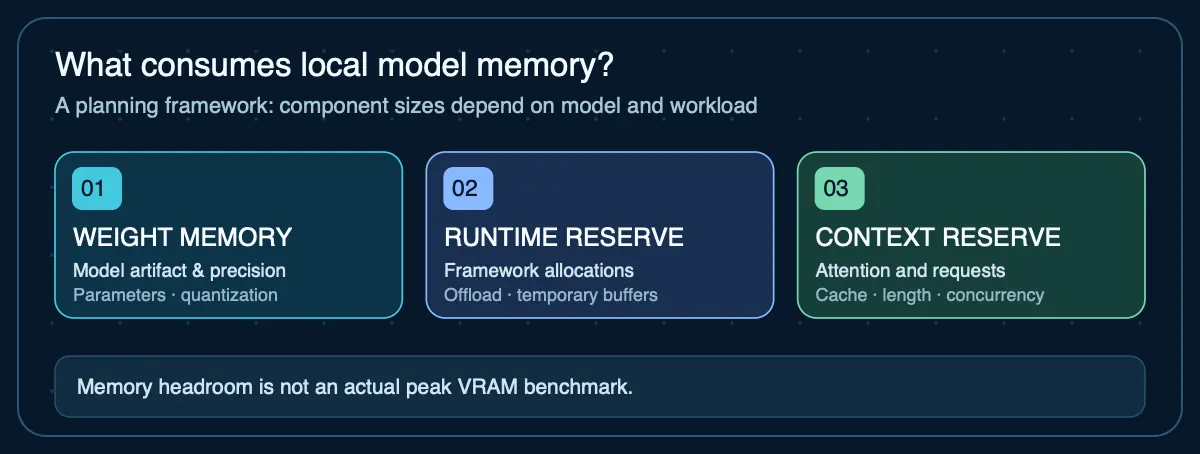
LLM RAM and VRAM Calculation Method
Weight memory = parameters × bits per parameter ÷ 8. Runtime reserve is then added as a percentage of weight memory, followed by the explicit context reserve you enter.
The result is intentionally conservative and transparent. Actual runtime memory can differ because of model architecture, KV cache, batch size, framework overhead, temporary buffers, and implementation.
Why context reserve is manual: exact attention-cache memory cannot be inferred safely from parameter count alone. For a real deployment, measure the specific model and runtime at the context length and batch size you intend to use.
Your next step
This planning estimate is within a base Mac mini's advertised memory tier, but real quantized files, cache and macOS usage may still prevent the model from fitting. Check the exact configuration.
Check this against a Mac mini configuration →Use this calculator on your site
Embed the live calculator free. Keep the attribution link so readers can inspect the calculation method and evidence notes.
How much RAM or VRAM does a local LLM need?
The minimum starts with model size and quantization, but real runtime memory is higher. Context length, framework overhead, temporary buffers, batch size, and the exact model architecture all affect the final requirement.
Is 16GB of VRAM enough for a local LLM?
It can be enough for many smaller models and some larger quantized models, but it is not a universal cutoff. Leave headroom rather than assuming a model is safe simply because its weight file is smaller than 16 GB.
Why this calculator uses a manual context reserve
Exact attention-cache memory cannot be determined reliably from parameter count alone. Entering an explicit reserve keeps the result honest while still making the tool useful for capacity planning.
Why this calculator may differ from other AIG tools
This calculator estimates weight memory from parameter count and bit width. Real quantized model files include metadata, vocabulary tensors, and format overhead that make the actual artifact larger than the theoretical floor. The compatibility checker starts from verified Ollama artifact sizes instead and will typically produce a higher estimate. Both tools then add explicit reserves for runtime and context.
Neither tool measures actual runtime memory. Use them as planning inputs, then validate the specific model, runtime, and context configuration before committing to a hardware purchase.
Related sizing references
For architecture and quantization context on a specific model, or to check an estimate against verified artifact sizes:
Agent Infrastructure Recommendation Kit
Turn the memory estimate into an infrastructure plan
Use the Recommendation Kit to carry sizing assumptions into a documented comparison of local hardware, GPU cloud, VPS, and hybrid options, then validate and defend the final choice.
Get the Recommendation Kit — $19