GPU infrastructure
Best GPU Cloud Providers 2026: LLM Pricing, VRAM & Availability
GPU cloud providers differ on much more than the advertised GPU-hour. Training usually favors reliable high-VRAM capacity, fast storage and multi-GPU networking; inference may favor lower-cost cards, serverless billing, fast startup or persistent endpoints. Start with model memory and workload duration, then compare the effective cost rather than choosing the cheapest advertised GPU-hour.
GPU rental comparison: what matters before price
A useful GPU rental comparison starts with the model, not the provider. First determine the VRAM tier you need, then compare only providers with capacity you can actually provision. After that, compare persistence, storage, egress, cold-start behavior, billing granularity and whether the workload needs a single GPU or fast multi-GPU interconnects.
For LLM inference, low idle cost and fast startup can matter more than peak training throughput. For training and fine-tuning, sustained availability, local storage speed and GPU-to-GPU networking can dominate the effective cost. The tables below separate those decisions instead of treating every cloud GPU provider as interchangeable.
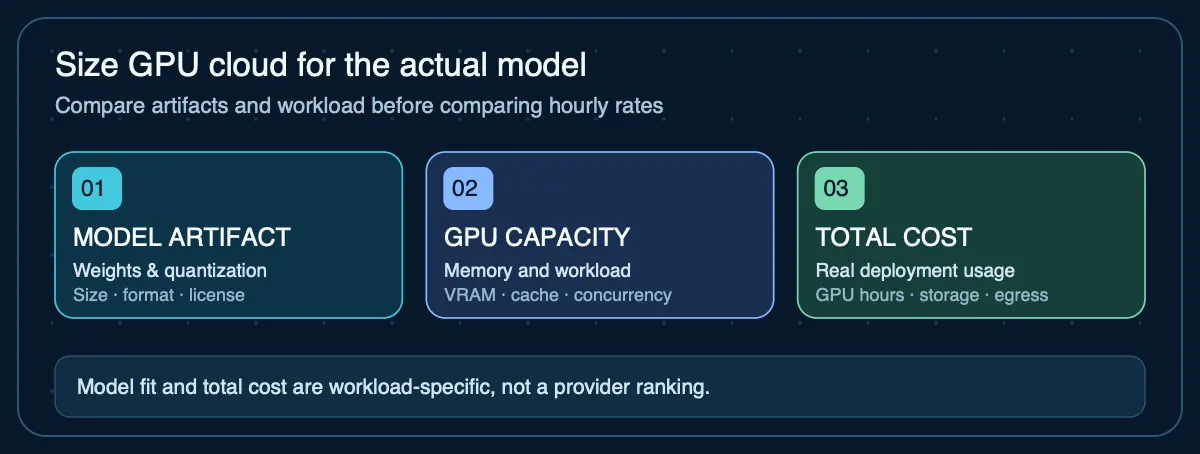
Know which GPU tier your model actually needs
Calculate VRAM first so you compare providers and prices in the right hardware tier.
How to choose a GPU cloud provider
The decision depends on more than the GPU name and hourly price. Work through these considerations in order — each one can eliminate options before you reach price comparison.
- Define the workload type. Training, fine-tuning, persistent inference, bursty inference, batch processing, and experimentation reward different infrastructure. A persistent agent endpoint has different requirements from a weekend fine-tuning job.
- Calculate VRAM first. Use the model's parameter count, target precision, expected context length, and batch size to estimate the minimum GPU memory. Eliminate GPUs that cannot fit the model and working memory. Use the VRAM calculator →
- Decide persistence vs. ephemeral. Does the workload need to survive restarts? Does it need an always-on endpoint? Persistent GPU Pods or dedicated instances stay allocated; serverless or spot capacity may be interrupted or cold-started.
- Check exact GPU availability. A low published rate is not useful if the card is unavailable in the region or quantity you need. Check current availability before committing to a provider.
- Add storage and transfer costs. Persistent disks, checkpoint storage, model downloads, and data egress can materially change the effective cost. Some providers include storage; others bill it separately.
- Assess cold start and provisioning time. Serverless endpoints may take seconds to minutes to load a model. Persistent instances avoid cold starts but cost more during idle time. Measure this for your specific model size.
- Consider networking and egress. If the GPU server needs to communicate with agents, databases, or users in a specific region, network latency and transfer charges matter. Some providers have free internal networking; others charge per GB.
- Evaluate operational responsibility. Self-managed GPU instances require you to handle OS updates, driver versions, runtime configuration, monitoring, and recovery. Managed or serverless offerings shift some of that work to the provider.
- Measure the real job. Compare time-to-completion or tokens-per-dollar after the workload is reproducible. Published benchmarks may not match your model, precision, batch size, and context.
GPU cloud provider comparison
| Provider type | Infrastructure model | Good fit | Important caveat |
|---|---|---|---|
| Runpod | Persistent GPU Pods, Serverless endpoints, and multi-GPU clusters | Flexible inference, experiments, persistent GPU workloads, serverless-style deployment | Broad GPU selection from 24 GB to 288 GB VRAM. Per-second billing on Pods. Availability varies by GPU and region. |
| Lambda | Dedicated GPU instances (1×–8× GPU) and larger GPU clusters | Dedicated AI workloads, multi-GPU training, higher-end NVIDIA infrastructure | Self-serve instances from A6000 through B200. Multi-GPU instances share system RAM and vCPUs. Availability varies. |
| Marketplace / spot-style GPU clouds | Independent hosts or variable-capacity GPU marketplaces | Cost-sensitive jobs where availability can be flexible | Potentially lower prices, but host quality, availability, networking, and persistence require closer scrutiny. |
| Hyperscale cloud GPU | GPU VMs and managed AI infrastructure (AWS, GCP, Azure) | Existing cloud environments, enterprise controls, integrated networking and storage | Strong ecosystem integration, but pricing and setup complexity can be higher. Commitment-based discounts available. |
Serverless GPU vs. dedicated GPU instances
Serverless GPU endpoints bill per request or per second of active inference and can scale to zero when idle. Dedicated instances stay allocated whether or not inference is running. The tradeoff:
- Serverless avoids paying for idle time, but cold starts add latency when the model is not already loaded. Larger models have longer cold starts. Best fit for bursty or low-utilization workloads.
- Dedicated eliminates cold starts and guarantees capacity, but you pay for every hour the instance runs — including idle time. Best fit for persistent inference endpoints with steady traffic.
GPU cloud VRAM tiers and what they support
| VRAM tier | Example GPUs | Typical fit | Limitation |
|---|---|---|---|
| 16–24 GB | RTX 4090, L4, A10 | Small models, aggressively quantized mid-size models, embeddings | Larger models at higher precision will not fit. Context length limited by remaining VRAM after weights. |
| 48 GB | A6000, RTX 6000 Ada, L40S, A40 | Quantized mid-to-large models, moderate context, single-user inference | Full-precision 27B+ models may still exceed capacity with context overhead. |
| 80 GB | A100, H100 | Larger models at higher precision, long context, training, concurrent inference | 70B+ models at full precision may still require multi-GPU or aggressive quantization. |
| 96–141 GB | GH200, H200 | Large full-precision models, long context with headroom, high-throughput serving | Higher per-hour cost. Availability may be limited. |
| 180–288 GB | B200, B300 | Very large models, multi-model serving, extensive batch processing | Newest generation. Availability, pricing, and software support are still evolving. |
Compare GPU cloud pricing beyond $/GPU-hour
The advertised GPU-hour rate is only one component of total cost. Comparing providers on hourly rate alone will mislead you.
- Compute charge: Hourly, per-second, or serverless billing. Per-second billing reduces waste on short jobs.
- Persistent storage: Disk costs while the GPU is stopped. Some providers charge for storage even when compute is off.
- Network and egress: Data transfer out of the provider. Can be significant for serving inference to end users.
- Cold start or provisioning delay: Time and compute spent loading models before useful work begins.
- Idle cost: What you pay when the instance is running but not serving inference. Serverless avoids this; dedicated does not.
- GPU availability: The cheapest option is useless if the GPU is never available when you need it.
- Operational overhead: Your time patching, monitoring, recovering, and managing the infrastructure is a real cost.
Use the Agent Hosting Cost Calculator to compare total monthly cost across deployment options with the same workload assumptions.
Interactive calculator · bring your own prices
Compare two equivalent GPU cloud quotes
Compare the same GPU tier, VRAM, region, availability and billing conditions. No provider prices are pre-filled. Enter quotes from the dated source table or from checkout, then include storage and traffic charges.
Enter a positive hourly price for each quote to compare monthly totals.
Result is arithmetic, not a verified ranking. Actual resource pricing, CPU, RAM, regional availability, performance, interruption policies, taxes, discount terms and currency differences still require validation. Avoid sending sensitive quotes or credentials.
When local hardware may be preferable to cloud GPU
- High, predictable utilization where owned hardware pays back faster than rental.
- Data sovereignty or compliance requirements that prohibit sending data to a cloud provider.
- Models that fit in Apple silicon unified memory or a consumer GPU already owned.
- Development and experimentation where latency to a remote GPU adds friction.
See Local AI vs Cloud GPU for a structured comparison framework.
Current documented GPU cloud prices
These are dated first-party price observations, not hands-on performance rankings. GPU availability, regions, cloud tiers, taxes, storage and other charges can change the effective cost.
| Provider | Product | GPU | VRAM | Published price | Source |
|---|---|---|---|---|---|
| Runpod | RTX 4090 Pod | NVIDIA RTX 4090 | 24 GB | $0.74/hour | Official pricing Data checked 2026-09-17 · Source: Runpod Secure Cloud pod. 24 GB VRAM, 41 GB RAM, 6 vCPUs. |
| Runpod | RTX 6000 Ada Pod | NVIDIA RTX 6000 Ada | 48 GB | $0.84/hour | Official pricing Data checked 2026-09-17 · Source: Runpod Secure Cloud pod. 48 GB VRAM, 167 GB RAM, 10 vCPUs. |
| Runpod | L40S Pod | NVIDIA L40S | 48 GB | $1.09/hour | Official pricing Data checked 2026-09-17 · Source: Runpod Secure Cloud pod. 48 GB VRAM, 94 GB RAM, 16 vCPUs. |
| Runpod | A100 PCIe Pod | NVIDIA A100 PCIe | 80 GB | $1.59/hour | Official pricing Data checked 2026-09-17 · Source: Runpod Secure Cloud pod. 80 GB VRAM, 117 GB RAM, 8 vCPUs. |
| Runpod | H100 PCIe Pod | NVIDIA H100 PCIe | 80 GB | $2.89/hour | Official pricing Data checked 2026-09-17 · Source: Runpod Secure Cloud pod. 80 GB VRAM, 188 GB RAM, 16 vCPUs. |
| Runpod | H200 Pod | NVIDIA H200 | 141 GB | $4.59/hour | Official pricing Data checked 2026-09-17 · Source: Runpod Secure Cloud pod. 141 GB VRAM, 276 GB RAM, 24 vCPUs. |
| Lambda | 1× A6000 Instance | NVIDIA A6000 | 48 GB | $1.09/hour | Official pricing Data checked 2026-09-17 · Source: Lambda 1× GPU self-serve instance. 48 GB VRAM, 100 GB RAM, 14 vCPUs. |
| Lambda | 1× GH200 Instance | NVIDIA GH200 | 96 GB | $2.29/hour | Official pricing Data checked 2026-09-17 · Source: Lambda 1× GPU self-serve instance. 96 GB VRAM, 432 GB RAM, 64 vCPUs. |
| Lambda | 1× H100 PCIe Instance | NVIDIA H100 PCIe | 80 GB | $3.29/hour | Official pricing Data checked 2026-09-17 · Source: Lambda 1× GPU self-serve instance. 80 GB VRAM, 225 GB RAM, 26 vCPUs. |
| Lambda | 1× H100 SXM Instance | NVIDIA H100 SXM | 80 GB | $4.29/hour | Official pricing Data checked 2026-09-17 · Source: Lambda 1× GPU self-serve instance. 80 GB VRAM, 225 GB RAM, 26 vCPUs. |
Why GPU cloud provider rankings change
GPU pricing, availability, and hardware generations change frequently. Agent Infra Guide dates provider observations and separates observed prices from durable technical characteristics instead of treating one price snapshot as a permanent ranking. Check Can I Run This Model? to verify whether a specific GPU can fit your target model before comparing prices.
Agent Infrastructure Recommendation Kit
Comparing GPU cloud options for a real deployment?
The Agent Infrastructure Recommendation Kit walks you through defining requirements, estimating GPU and memory capacity, comparing cloud vs. local vs. hybrid options with documented evidence, and producing a defensible infrastructure recommendation.
Get the Recommendation Kit — $19