GPU sizing
How Much VRAM Do I Need for an LLM?
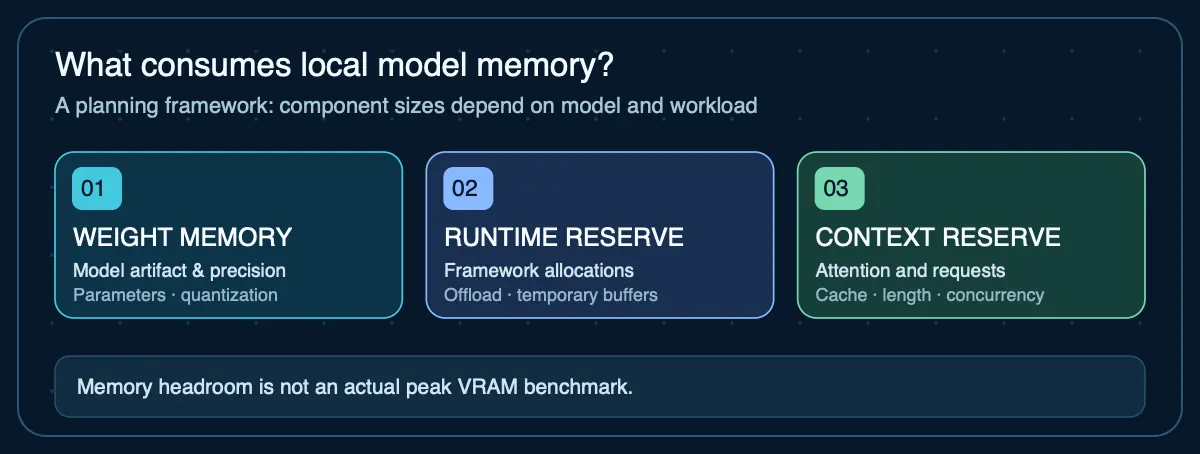
You need enough VRAM for model weights plus context/KV cache and runtime overhead at the concurrency you expect. A parameter-count shortcut can estimate weight memory, but it cannot establish the VRAM required by a real inference workload.
Quantization changes weight memory substantially
Hugging Face documents 8-bit inference as using roughly half the weight memory of full precision, with 4-bit quantization compressing weights further. Treat these as weight-memory relationships rather than promises about total process memory.
Context and parallel requests consume the headroom
Ollama documents that parallel requests increase context allocation and that models loaded concurrently must fit available memory. For agent infrastructure, test with realistic prompt histories, retrieved documents and simultaneous jobs.
What if the model does not fit one GPU?
Some runtimes can distribute a model across multiple GPUs or offload portions to system memory, but this changes performance and architecture. Ollama documents spreading a model across available GPUs when it cannot fit on one.
Estimate the VRAM for your model
Weight memory is parameters × bits ÷ 8. The runtime and context reserves are entered explicitly, because neither can be inferred safely from parameter count alone.
Why context reserve is manual: exact attention-cache memory cannot be inferred safely from parameter count alone. For a real deployment, measure the specific model and runtime at the context length and batch size you intend to use.
Your next step
This planning estimate is within a base Mac mini's advertised memory tier, but real quantized files, cache and macOS usage may still prevent the model from fitting. Check the exact configuration.
Check this against a Mac mini configuration →Open the full RAM and VRAM calculator → for the method, the caveats, and how it differs from the artifact-based compatibility checker.
Sources
- Hugging Face — bitsandbytes— 8-bit and 4-bit quantization guidance
- Ollama — FAQ— VRAM fit, multi-GPU loading, context and concurrency
Agent Infrastructure Recommendation Kit
Carry your VRAM estimate into the full infrastructure decision
The Agent Infrastructure Recommendation Kit gives you a six-step system to define requirements, estimate capacity, compare local, cloud, VPS, GPU, and hybrid options, document evidence, and make the recommendation.
Get the Recommendation Kit — $19