Qwen infrastructure
Qwen Hardware Requirements: RAM and VRAM by Model and Quantization
Qwen hardware requirements depend on the exact model, precision or quantization, context length, inference runtime, batch size, and whether the workload runs entirely on GPU, unified memory, or with CPU offload. This page uses a three-layer sizing framework: parametric estimate → actual model artifact fit → conservative workload planning.
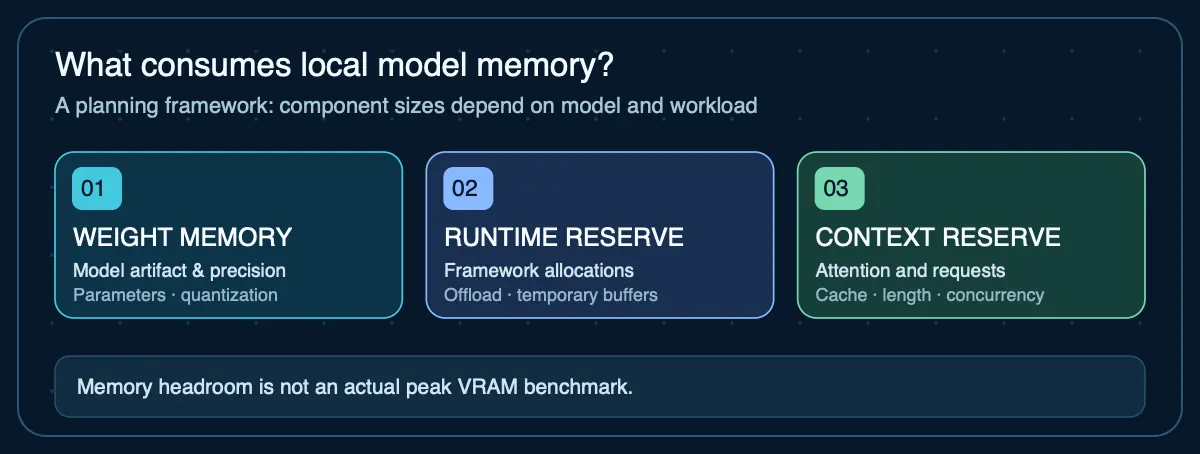
Qwen hardware requirements: quick answer
For Qwen, start with the exact model artifact rather than a generic model-family minimum. A 4-bit weight estimate is roughly 0.5 GB per billion parameters before format, context, runtime, and concurrency overhead. That puts an 8B model near a 4 GB weight floor, 14B near 7 GB, 27B near 13.5 GB, and 32B near 16 GB. Treat those as floors—not guaranteed VRAM requirements—and leave capacity for the runtime and workload.
Qwen minimum system requirements: 8, 16, or 24 GB of VRAM?
There is no single Qwen minimum. Choose a specific model artifact first; the following comparisons use Ollama's listed Qwen3.5 download sizes, not AIG-measured GPU usage. Runtime overhead, context cache, concurrency, and the OS require additional memory.
| Available GPU VRAM | Starting point to investigate | What the file-size evidence actually says |
|---|---|---|
| 8 GB | Qwen3.5 4B | Ollama lists 3.3–4.0 GB files. The 9B listing (6.6–7.6 GB) leaves little room for runtime and context on an 8 GB GPU. |
| 16 GB | Qwen3.5 9B | The published 6.6–7.6 GB file range leaves more room than a tight 8 GB configuration. This is not a measured total VRAM requirement. |
| 24 GB | Qwen3.5 27B, after testing headroom | Ollama lists 17–20 GB files. The 35B listing is about 22 GB, leaving very limited room; neither is guaranteed to fit your context and runtime. |
These are file-size screening examples, not minimum GPU benchmarks or a purchase guarantee. Apple silicon unified memory also serves macOS and other apps, so a 24 GiB Mac is not equivalent to a dedicated 24 GB VRAM card. Sizes checked October 30, 2026 from Ollama's Qwen3.5 model library.
For the 7B, 14B and 32B coding-model memory calculations, see the Qwen2.5-Coder hardware guide. For rental GPUs, compare Qwen cloud-GPU tiers.
Sizing framework: three layers
Do not plan hardware from a single number. Each layer adds information the previous one does not have:
- Parametric estimate: Parameter count × bits per weight ÷ 8 = approximate weight floor in bytes. This is the fastest calculation but ignores model file metadata, quantization overhead, and runtime requirements.
- Actual model artifact fit: The real file size of the quantized or full-precision model on Hugging Face or Ollama. This is more accurate than the parametric estimate because it accounts for quantization format overhead, embedding tables, and metadata. Check the specific GGUF, AWQ, GPTQ, or safetensors file you plan to deploy.
- Conservative workload planning: Model artifact size + context/KV cache + runtime/framework overhead + OS/application reserve + concurrency headroom = total memory planning target. This is the number that determines whether the hardware actually works.
Layer 1: Parametric weight estimates
| Model size | 16-bit weight floor | 8-bit floor | 4-bit floor |
|---|---|---|---|
| 0.6B | ~1.2 GB | ~0.6 GB | ~0.3 GB |
| 4B | ~8 GB | ~4 GB | ~2 GB |
| 8B | ~16 GB | ~8 GB | ~4 GB |
| 14B | ~28 GB | ~14 GB | ~7 GB |
| 27B | ~54 GB | ~27 GB | ~13.5 GB |
| 32B | ~64 GB | ~32 GB | ~16 GB |
CALCULATED. These are parameter count × bit width ÷ 8. Real quantized files include additional data and overhead — see Layer 2.
Run Layer 1 for your own Qwen configuration
Starts on Qwen3.5 27B at 4-bit — the 13.5 GB weight floor in the table above. Change the precision or enter another parameter count to see the rest of Layer 1, then add the reserves Layer 3 describes.
Why context reserve is manual: exact attention-cache memory cannot be inferred safely from parameter count alone. For a real deployment, measure the specific model and runtime at the context length and batch size you intend to use.
Your next step
This estimate exceeds a base 16 GB configuration. Compare larger Mac memory tiers and leave space for macOS and runtime overhead before deciding.
Compare Macs that reach this much memory →Open the full RAM and VRAM calculator → for the method, the caveats, and how it differs from the artifact-based compatibility checker.
Layer 2: Actual model artifact sizes
The parametric estimate is a starting point. The actual model file you deploy is typically larger than the floor because quantization formats include scales, offsets, embedding tables, and metadata. Check the specific file on Hugging Face or the Ollama library for the exact size.
For example, the Qwen3.5-27B BF16 safetensors repository is approximately 55.6 GB — slightly larger than the 54 GB parametric estimate. GGUF quantizations of the same model will vary by quantization level: Q4_K_M files are substantially smaller than Q8 files.
Use the VRAM calculator for parametric estimates, and Can I Run This Model? to check whether a specific GPU can accommodate the workload.
AIG-measured evidence — separate from estimates above
Real Qwen2.5 7B measurements on a 24 GiB Mac
Our published lab includes seven Qwen2.5 7B Instruct Q4_K_M runs on an Apple M4 Pro with 24 GiB unified memory, across different small tasks and 8K/32K allocated contexts. The recorded decode rates range from 42.7 to 45.7 tokens/s, with sampled serving-process peak RSS of 5.34–6.75 GB in those runs. RSS is not GPU-only VRAM or a minimum RAM requirement, and the results are not Qwen3.5 measurements or evidence of performance on other hardware.
Layer 3: Workload planning — what adds to the weight floor
A model that appears to fit exactly into available memory can still fail once runtime overhead is included. Plan for all of these components:
- Quantization format overhead: The actual model artifact is typically larger than parameter count × bits ÷ 8 because quantization formats store additional data (scales, zero points, metadata).
- Context / KV cache: Memory grows with context length. For Qwen3.5/3.8 hybrid architectures, the KV cache behavior depends on the mix of attention types — a generic formula is not reliable. Measure with the actual runtime.
- Runtime and framework overhead: The inference engine (Ollama, vLLM, SGLang, llama.cpp, MLX) consumes memory beyond the model and KV cache. This varies by engine.
- OS and application reserve: On a GPU server, reserve system RAM for the OS and other services. On Apple silicon unified memory, the same pool serves the OS, apps, and model.
- Concurrency: Each concurrent inference slot allocates its own KV cache. Ollama documents that memory scales with
OLLAMA_NUM_PARALLEL × context length. - Multimodal components: Qwen3.8 includes a vision encoder. Image inputs require additional memory beyond text-only inference.
- Planning headroom: Budget at least 10–20% headroom beyond the calculated total. Running at maximum capacity leaves no room for spikes, framework updates, or configuration changes.
Which Qwen models can run in 16 GB of VRAM?
Qwen3 models up to 8B parameters at most quantizations fit within 16 GB. Larger models at Q4 quantization may fit by weight alone, but leaving room for context cache and runtime overhead is critical. Plan around the full runtime requirement — not the model file size alone.
How much RAM does Qwen need?
System RAM and GPU VRAM answer different questions. A GPU-first deployment needs enough VRAM for the model artifact plus caches and runtime allocations, while system RAM still supports the operating system, inference engine, model loading, CPU offload, and other services. CPU-only and Apple-silicon deployments rely much more heavily on system or unified memory. Do not use the model's download size as the machine's total RAM requirement.
Qwen minimum requirements vs recommended capacity
A minimum requirement only answers whether a configuration may load. A useful deployment also needs room for the context window, runtime, concurrent requests, and the rest of the machine. For purchasing or production planning, size from the actual artifact and add explicit workload reserves instead of targeting a configuration that only barely fits.
How to verify that Qwen actually fits
A sizing estimate cannot tell you whether a model stays on GPU at your intended context. Record the exact model and quantization, and test on your real workload before buying hardware.
- Record the exact model tag, artifact size, quantization, runtime version, and configured context length.
- With Ollama, run a representative prompt and check
ollama ps. Its PROCESSOR column indicates CPU, GPU, or mixed placement. - On NVIDIA, observe GPU memory using
nvidia-smi; on Apple silicon, monitor unified-memory pressure. Neither provides a complete per-model measurement on its own. - Repeat at planned context and concurrency. Measure completion, latency, offload and memory failures before selecting hardware.
This is a reproducible procedure, not evidence that AIG tested every configuration. Inspect the published benchmark runs and limitations.
Can Qwen run locally without a GPU?
Yes. CPU-only inference is possible with Ollama, llama.cpp, and other runtimes, particularly for smaller and quantized models. Apple silicon Macs can use unified memory through MLX or Ollama. CPU-only inference is slower than GPU-accelerated inference — how much depends on the model size and hardware. For practical CPU/unified-memory sizing, see the local AI RAM requirements guide.
MoE models: Qwen3-235B-A22B
The Qwen3-235B-A22B model uses a sparse mixture-of-experts architecture: 235B total parameters but only ~22B active parameters per token. The full model must still be loaded into memory (all expert weights), even though only a subset activates during inference. This means the VRAM requirement is closer to the total parameter count than the active count. Multi-GPU deployment is typically required.
Sources
- Qwen3.5-27B model card— Model size, hybrid architecture, context length, deployment recommendations
- Qwen3.8-27B model card— Vision-language architecture, serving engine recommendations
- Qwen3 model collection— Full Qwen3 family including dense, MoE, and quantized variants
- Ollama Qwen3.5 library — variant file sizes— Published 4B, 9B, 27B and 35B download size listings; not full runtime memory requirements
- AIG measurement lab — Qwen2.5 7B Instruct— Original run IDs, host conditions, speed and sampled serving-process RSS
- Ollama FAQ — memory and concurrency— Memory scaling with parallel slots, context length and Ollama CPU/GPU processor reporting
Agent Infrastructure Recommendation Kit
Sizing hardware for Qwen deployment?
The Agent Infrastructure Recommendation Kit helps you work through the full sizing framework — parametric estimates, artifact fit, workload planning — and compare local, cloud, and hybrid deployment options with documented evidence.
Get the Recommendation Kit — $19