VPS for AI agents
Best VPS for AI Agents in 2026: RAM, CPU & Deployment Guide
There is no universal best VPS for AI agents — the right plan depends on whether inference is local or API-based, how many tools the agent runs, and whether you need browsers, containers, or databases alongside the agent process. This guide helps you match workload characteristics to infrastructure requirements using documented provider specifications.
Hosting partner · affiliate link
Explore Flashcloud hosting
Flashcloud is a hosting partner you can evaluate alongside the published hosting options below. Agent Infra Guide has not independently benchmarked its plans for AI agents. Before choosing any service, check current CPU, RAM, regions, renewal pricing, supported workloads, backups, and terms against your own requirements.
Affiliate disclosure: A qualifying purchase through this Flashcloud link may earn us a commission at no extra cost to you. This is a partner option, not a tested recommendation or ranking. See our affiliate disclosure.
What Determines VPS Size for an AI Agent?
Infrastructure needs vary by workload, not by label. The table below maps workload characteristics to the infrastructure variables that matter. Use it to identify which constraints apply to your deployment before selecting a provider plan.
| Workload characteristic | Infrastructure implication | What to verify |
|---|---|---|
| API-model agent (no local inference) | CPU and RAM for the agent process only. No GPU needed. | Outbound API latency from VPS region. Agent idle/active RAM (framework-specific — most are not documented). |
| Local-model agent (Ollama, LM Studio) | GPU VRAM or unified memory sized for model weights + context. CPU VPS is usually insufficient. | Model quantization and context length. Whether the VPS has GPU availability in your region. |
| Browser-heavy agent (Playwright, Puppeteer) | Chromium can use 500 MB+ per tab. Multiple concurrent tabs compound quickly. | Peak concurrent browser tabs. Whether headless Chromium runs reliably on the VPS kernel. |
| Always-on messaging agent | Must survive reboots and crashes. Needs process supervision, persistent state, and backups. | Process manager (systemd, Docker restart policy). Backup frequency for state/database. |
| Multi-agent / concurrent workload | Each agent process adds RAM and CPU. Containers add overhead. | Peak concurrent agents. Whether workloads can be scheduled instead of parallel. |
VPS Sizing Starting Points
| Workload | Starting CPU | Starting RAM | Storage | Planning note |
|---|---|---|---|---|
| Light API-based agent | 2 vCPU | 4 GB | 40 GB SSD+ | Good starting point for one lightweight agent using hosted model APIs. |
| Agent + browser + containers | 4 vCPU | 8 GB | 80 GB SSD+ | More headroom for Chromium, Docker, queues, small databases and MCP servers. |
| Multiple agents / heavier automation | 4–8 vCPU | 16 GB+ | 100 GB SSD+ | Useful when several workers, browsers, databases or background services share the host. |
| Local LLM inference | Workload dependent | Model dependent | Model dependent | Use a GPU VPS, GPU cloud or dedicated/local AI server when the model runs on the machine. |
How much RAM does an AI agent need?
There is no universal RAM requirement. Agents that call hosted model APIs usually need far less memory than systems that load language models locally. You also need headroom for browsers, databases, queues, MCP servers, containers, and other tools the agent launches. Watch actual memory pressure after deployment and resize before the host begins swapping heavily or killing processes.
Does an AI agent need a GPU VPS?
Not necessarily. If the agent uses a remote model API, a normal CPU VPS can be sufficient. A GPU becomes relevant when the same server is also responsible for local model inference, training, accelerated embeddings, image generation, or another GPU workload. In that case, choose by model memory and workload first, not by the VPS label.
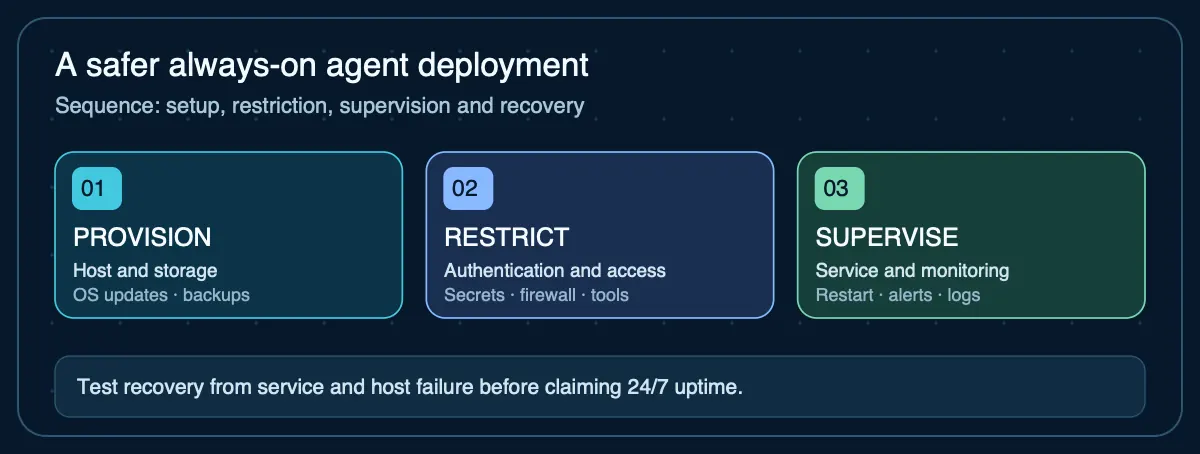
How to deploy an AI agent on a VPS
- Provision a current Linux VPS. Pick a region near the APIs, users, databases, or webhooks the agent talks to most often.
- Create a non-root administration path. Use SSH keys, least-privilege users, updates, and firewall rules instead of operating the agent directly as root.
- Install the runtime. Docker is a common choice because it packages the agent and its dependencies consistently; a native Python, Node, or system service can also work.
- Keep secrets outside the repository. API keys, database credentials and tokens should come from environment variables or a secrets system, not committed source files.
- Make the process persistent. Configure Docker restart policies or a service manager so the agent returns after crashes and host reboots.
- Expose only the ports you need. Keep administration and model endpoints private where possible; put public webhooks or APIs behind authentication and encrypted transport.
- Monitor and back up state. Track uptime, memory, disk, logs, failed jobs and queue depth, and back up the databases or files you cannot recreate from code.
Framework-Specific VPS Guides
Different agent frameworks have different runtimes, persistence models, and network defaults. For framework-specific VPS guidance:
- OpenClaw VPS deployment guide — TypeScript/Node.js gateway, loopback-by-default, official Docker and provider-specific deployment guides
- Hermes Agent VPS guide — Python agent with 5 terminal backends, SQLite persistence, 64k-token context requirement for local models
What matters when choosing a VPS for an AI agent?
- Enough RAM for the runtime and tools with useful headroom.
- Persistent storage and a reliable backup path.
- Automatic recovery after crashes and machine reboots.
- Secure SSH, firewalling, and network-access controls.
- Predictable bandwidth and outbound connectivity.
- A region close enough to important APIs and users.
- Pricing that remains reasonable when the server runs continuously.
- An upgrade path if browsers, databases or concurrent workers grow.
VPS vs dedicated server for AI agents
A VPS is usually the better first host for an API-based agent because it is cheap to resize and simple to replace. A dedicated server becomes more attractive when you need the full physical machine, fixed hardware, substantial local storage, custom GPU capacity, or more predictable control over a persistent workload.
Current VPS pricing for AI agent hosting
These are dated first-party pricing observations. They are not performance rankings, and promotional prices should not be treated as permanent renewal prices.
| Provider | Plan | RAM | Published price | Source |
|---|---|---|---|---|
| DigitalOcean | Basic Droplet — 1 GB | 1 GB | $6.00/month | Official pricing Data checked 2026-09-16 · Source: DigitalOcean 1 vCPU, 25 GiB SSD, 1,000 GiB transfer. CPU Droplets are billed per second with a monthly cap. |
| DigitalOcean | Basic Droplet — 2 GB | 2 GB | $12.00/month | Official pricing Data checked 2026-09-16 · Source: DigitalOcean 1 vCPU, 50 GiB SSD, 2,000 GiB transfer. Published Basic Droplet price. |
| DigitalOcean | Basic Droplet — 4 GB | 4 GB | $24.00/month | Official pricing Data checked 2026-09-16 · Source: DigitalOcean 2 vCPUs, 80 GiB SSD, 4,000 GiB transfer. Published Basic Droplet price. |
| DigitalOcean | Basic Droplet — 8 GB | 8 GB | $48.00/month | Official pricing Data checked 2026-09-16 · Source: DigitalOcean 4 vCPUs, 160 GiB SSD, 5,000 GiB transfer. Published Basic Droplet price. |
| Hostinger | KVM 1 — promotional term price | 4 GB | $6.49/month | Official pricing Data checked 2026-09-16 · Source: Hostinger 1 vCPU, 50 GB NVMe, 4 TB bandwidth. Promotional monthly equivalent; renews at $11.99/mo for a 2-year renewal term. |
| Hostinger | KVM 2 — promotional term price | 8 GB | $8.99/month | Official pricing Data checked 2026-09-16 · Source: Hostinger 2 vCPU, 100 GB NVMe, 8 TB bandwidth. Promotional monthly equivalent; renews at $14.99/mo for a 2-year renewal term. |
| Hostinger | KVM 4 — promotional term price | 16 GB | $12.99/month | Official pricing Data checked 2026-09-16 · Source: Hostinger 4 vCPU, 200 GB NVMe, 16 TB bandwidth. Promotional monthly equivalent; renews at $28.99/mo for a 2-year renewal term. |
| Hostinger | KVM 8 — promotional term price | 32 GB | $25.99/month | Official pricing Data checked 2026-09-16 · Source: Hostinger 8 vCPU, 400 GB NVMe, 32 TB bandwidth. Promotional monthly equivalent; renews at $49.99/mo for a 2-year renewal term. |
Sources
- Docker Engine on Ubuntu— Official Docker installation and firewall considerations
- Docker restart policies— Official guidance for restarting containers after failures or reboots
- Ubuntu Server security documentation— Users, firewalling and layered server security
- OpenClaw — Installation— OpenClaw runtime requirements and deployment methods
- Hermes Agent — Installation— Hermes runtime requirements and platform support
Agent Infrastructure Recommendation Kit
Turn VPS sizing into a complete infrastructure recommendation
Use the Recommendation Kit to document workload requirements, compare VPS, local, GPU cloud and hybrid options, record current evidence and costs, and validate the architecture before deployment.
Get the Recommendation Kit — $19