OpenClaw security
OpenClaw Security: Is OpenClaw Safe?
OpenClaw can be run with a conservative security posture, but it is an agent gateway with access to messages, tools, browsers and credentials, so the deployment boundary matters. The safest baseline is to keep the gateway private, authenticate access, restrict senders and tools, and sandbox risky execution rather than exposing a powerful agent directly to untrusted input.
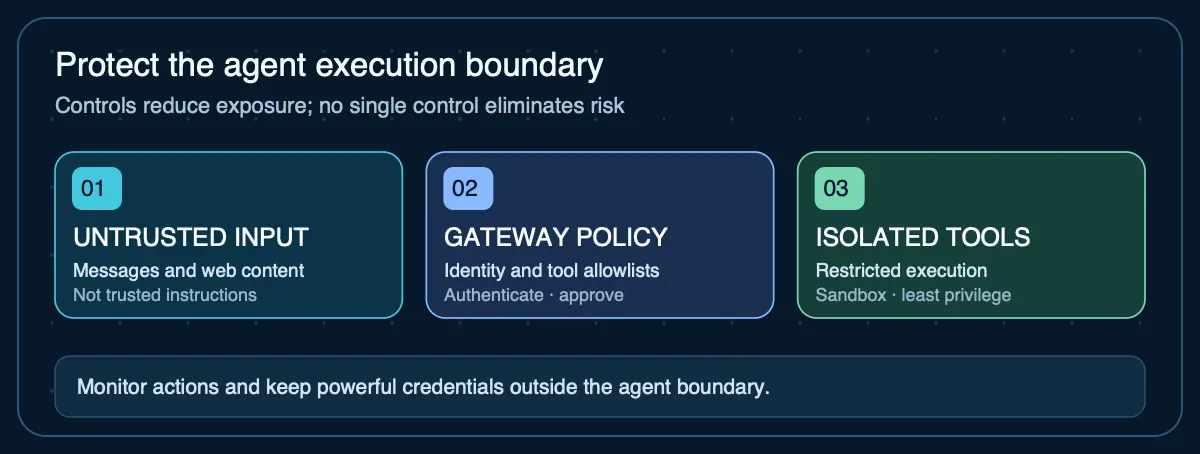
Check your configuration before exposing the gateway
Paste a sanitized JSON configuration into AIG’s browser-local checker to catch common exposure, authentication, sandbox and permission risks.
Check my OpenClaw configuration →Is OpenClaw safe to use?
OpenClaw documents conservative defaults for a normal host install: the gateway binds to loopback, unknown direct-message senders are generally paired before use, and group access is typically allowlisted. Those defaults reduce exposure, but safety depends on what you change afterward, which tools an agent can call, which credentials it can reach, and whether untrusted content can influence tool execution.
1. Run the OpenClaw security audit
OpenClaw ships a built-in audit command. Run openclaw security auditafter installation and after meaningful configuration changes. The project also documents a deeper audit mode for reviewing exposed deployments. Treat audit findings as configuration evidence, not a substitute for host and network security.
2. Keep the gateway private by default
Avoid direct public port-forwarding. OpenClaw's exposure guidance favors loopback, private-network access, authenticated tunnels or a correctly configured identity-aware proxy. If remote access is required, make the authenticated path the only route to the gateway.
3. Use pairing, allowlists and sender controls
Restrict which people and rooms can invoke the agent. Pairing and allowlists reduce the chance that an unknown sender can deliver instructions to an agent with useful tools. In broad or public groups, use mention gates or sender allowlists so ambient messages do not automatically become agent input.
4. Sandbox OpenClaw tool execution
OpenClaw sandboxing can move tool execution such as exec, read, write, edit and apply_patch into a restricted backend while the gateway itself remains on the host. Sandboxing is off by default for ordinary sessions, and the documentation explicitly says it is not a perfect security boundary. Its value is reducing the filesystem and process blast radius when a tool call behaves unexpectedly.
5. Limit workspace and credential access
Give each agent only the files and secrets required for its job. OpenClaw supports sandbox workspace modes that can hide the agent workspace, mount it read-only or allow read/write access. Prefer the smallest permission set that still lets the workflow succeed, and avoid putting broad cloud, SSH or package credentials inside an agent's reachable workspace.
6. Treat browser and tool access as privileged
Browser automation, shell execution, gateway administration and scheduled jobs can turn model output into real actions. Agents that process untrusted web pages, email or chat should not automatically inherit the same tool and credential access as a trusted operator session. Separate trust boundaries when the users or data sources do not trust each other.
OpenClaw security checklist
- Run the built-in security audit after setup and configuration changes.
- Keep the gateway on loopback or an authenticated private path.
- Use pairing and allowlists for DMs and groups.
- Deny tools the agent does not need.
- Enable sandboxing where untrusted input can reach executable tools.
- Use read-only or isolated workspaces when write access is unnecessary.
- Keep credentials out of broadly reachable files and logs.
- Review browser, plugin, skill and MCP access as part of the same threat model.
- Back up state and test recovery so security changes do not create fragile deployments.
Sources
- OpenClaw — Security— Trust model, audit command, access, prompt-injection and network hardening guidance
- OpenClaw — Sandboxing— Sandbox modes, scope, backends and the documented security boundary
- OpenClaw — Tool and agent permissions— Tool policy, workspace access and sandbox permission controls
- OpenClaw — Gateway exposure runbook— Private access patterns and public-exposure cautions
Agent Infrastructure Recommendation Kit
Document the security boundary before putting an agent online
The Agent Infrastructure Recommendation Kit helps you capture access, hosting, isolation, recovery and operational requirements before choosing a deployment architecture.
Get the Recommendation Kit — $19