OpenClaw on Mac
OpenClaw on Mac Mini: Setup, Local Models and Always-On Hosting
Yes, OpenClaw runs on Mac mini. It officially supports macOS with a menu-bar companion app and LaunchAgent service for automatic startup. The infrastructure question is whether you use the Mac mini as a gateway to cloud models, as a gateway plus local model server, or whether a VPS is a better fit for your uptime and access requirements.
OpenClaw macOS Support
| Feature | Details |
|---|---|
| macOS support | Officially supported |
| Apple Silicon | Supported (Node.js runs natively on ARM64) |
| Intel Mac | Supported (Node.js runs on x64) |
| Installation | Shell installer, npm/pnpm/bun, or menu-bar app |
| Background service | macOS LaunchAgent (auto-start on login) |
| Runtime | Node.js 24.16+ or 26.1+ (26 recommended) |
| State directory | ~/.openclaw/ |
| Default port | 18789 (loopback only) |
OpenClaw vs. Local Models: Different Resource Requirements
OpenClaw itself is a Node.js gateway process. Its resource requirements are separate from — and much smaller than — local model inference. Running Ollama with a 7B model on the same machine does not mean OpenClaw needs that RAM; it means the Mac mini needs enough unified memory for both processes combined.
| Component | What it needs | Evidence |
|---|---|---|
| OpenClaw gateway | Node.js process + state directory. Minimum RAM not documented. | TESTING PENDING |
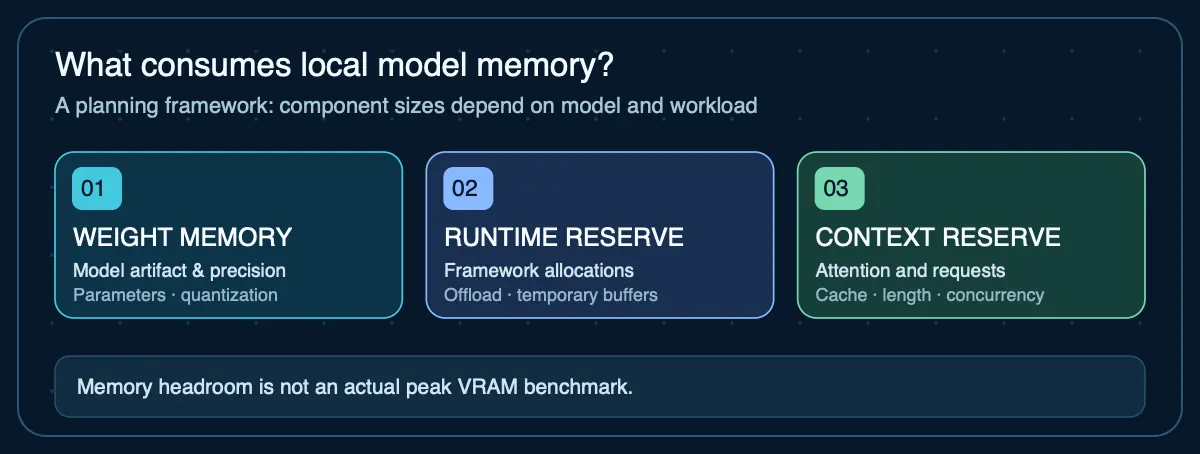
| Local model (Ollama) | Memory depends on the specific model artifact, quantization, context length, and runtime overhead. Check the model artifact size and leave headroom for macOS, OpenClaw, and the KV cache. | MODEL-SPECIFIC |
Current Mac Mini Configurations
Apple's current Mac mini lineup (September 2026) includes M6 and M5 Pro configurations. The previous M4 and M4 Pro models are discontinued.
| Model | Chip | Base memory | Max memory | US price (from) |
|---|---|---|---|---|
| Mac mini M6 | M6 (12-core CPU, 12-core GPU) | 16 GB | 32 GB | $899 |
| Mac mini M5 Pro | M5 Pro (15-core CPU, 16-core GPU) | 24 GB | 64 GB | $1,699 |
Source: apple.com/mac-mini/specs. Checked September 17, 2026. M5 Pro is configurable to 18-core CPU / 20-core GPU. Memory bandwidth: M6 up to 170 GB/s, M5 Pro 307 GB/s.
Three Deployment Architectures
1. Mac Mini + Cloud Models
Run OpenClaw on the Mac mini as a gateway to cloud model APIs (OpenAI, Anthropic, OpenRouter). The Mac mini handles the gateway process and messaging integrations; inference happens remotely.
- Lowest local resource requirements (gateway process only)
- M6 16 GB likely sufficient for gateway alone (awaiting AIG measurement)
- Model cost is a separate variable expense via API billing
- Requires internet connectivity for model access
- Privacy: conversation data leaves the Mac to reach the model provider
2. Mac Mini + Local Models (Ollama)
Run both OpenClaw and Ollama on the same Mac mini. OpenClaw auto-discovers local Ollama — no manual endpoint configuration needed. All inference stays on the machine.
- Memory must cover macOS + OpenClaw + model weights + context
- Model sizing depends on quantization and context length — use the LLM RAM/VRAM calculator or model compatibility checker
- No API cost for inference (compute is in the hardware)
- Full privacy — data does not leave the machine
- Larger models may require M5 Pro with 48-64 GB
3. VPS Instead of Mac Mini
Run OpenClaw on a Linux VPS instead of local hardware. This avoids owning and maintaining a physical machine.
- No upfront hardware cost ($10-12/mo for 2 GB VPS plans)
- 24/7 uptime does not depend on your home power or network
- No local model inference (CPU VPS, no GPU)
- See the OpenClaw VPS deployment guide for setup details
Always-On Mac Mini Considerations
Running OpenClaw as a persistent service on a Mac mini requires configuring macOS to stay awake and recover from interruptions.
- Prevent sleep: System Settings → Energy → "Prevent automatic sleeping when display is off"
- Wake for network: System Settings → Energy → "Wake for network access"
- CLI tools:
pmsetandcaffeinatefor energy management - LaunchAgent: OpenClaw's LaunchAgent service restarts the gateway after login
- No server mode: Apple does not publish a dedicated Mac mini server configuration guide
- macOS updates: automatic updates may restart the machine — schedule or defer them for production use
Remote Access to a Mac Mini
The OpenClaw gateway binds to loopback by default. To access it from another device, use SSH tunneling, Tailscale (documented integration), or a reverse proxy. The same remote-access architecture applies regardless of whether OpenClaw runs on Mac mini or a VPS.
Sources
- OpenClaw — Installation— macOS support, LaunchAgent service, and menu-bar app
- OpenClaw — Ollama Configuration— Ollama auto-discovery and local model setup
- Apple — Mac mini Technical Specifications— Current M6 and M5 Pro configurations, memory, and pricing
- Apple — Mac Energy Settings— Sleep prevention, wake for network, and energy management
Agent Infrastructure Recommendation Kit
Planning a Mac mini deployment for OpenClaw?
The Recommendation Kit helps you compare local Mac, VPS, and hybrid architectures — documenting workload requirements, hardware selection criteria, and the evidence behind your infrastructure decision.
Get the Recommendation Kit — $19